本文档供自行开发小程序或APP,进行蓝牙、WIFI对接时消息格式参考。
1.蓝牙服务和特征值
连接主服务ID:AE30
开启订阅:选择支持indicate的特征值
写入数据:选择支持write的特征值
2.蓝牙分包规则
消息分包发送,每次不超过20字节,每包第一字节为校验位。
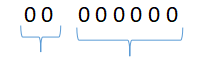
前2位:
- 10 表示 首包
- 01 表示 中间包
- 00 表示 结束包
后6位代表包数量
比如000001表示总共1个包,000100表示总共有4个包。
示例:
- 首包:10000004
- 中间包:01000001
- 中间包:01000002
- 结束包:00000003
3.消息结构
3.1 共用消息头header
| 字段 | 类型 | 含义 |
|---|---|---|
| traceId | String | 消息id,ack要与原消息的traceId一致 |
| payloadVersion | Int | 版本 |
| udid | String | 任意字符串 |
| timestamp | Int | 当前时间戳 |
| method | String | 操作方法,用于指定操作。1、device-properties-report:设备属性上报,当设备的属性修改(比如通过语音控制修改)时,由设备主动上报;2、device-properties-query:属性查询,设备收到后,用相同的方法应答;3、device-properties-query-all:所有属性查询,查询的属性放在属性列表properties中,设备收到后,用相同的方法应答;4、device-properties-control:属性设置,设置的属性值放在属性列表properties中,设备收到后,用相同的方法应答操作结果给小程序;5、device-discovery:设备发现,设备收到消息后,用相同的方法应答;6、device-auth-code-set:设置设备鉴权码,设备收到后保存鉴权码,并返回成功消息;7、device-auth-code-error:设备鉴权码错误,鉴权失败时返回消息 |
| auth_code | String | 设备密码,默认为空。如果需要设备生成密码,需要在小程序设备页选择设备密码为“设备本地密码”。如果密码校验不通过,返回retcode:4 |
属性名称、取值和对应执行的设备行为/变量,可以在生成的固件包的《properties_action_map.txt》文件中查看
3.2 消息体字段说明
3.2.1 单属性查询
| 字段 | 类型 | 含义 |
|---|---|---|
| properties | Array | 属性列表 |
| properties/id | String | 属性标识 |
| properties/value | Int或String | 属性取值 |
发送示例:
{
    "header": {
        "traceId": "xsd123456",
        "payloadVersion": 1,
        "udid": "abcdef",
        "timestamp": 0,
        "method": "device-properties-query",
        "auth_code": ""
    },
    "body": {
        "properties": [
            {
                "id": "VerticalSwitch",
            }
        ]
    }
}
返回示例:
{
    "header": {
        "traceId": "xsd123456",
        "payloadVersion": 1,
        "udid": "abcdef",
        "timestamp": 0,
        "method": "device-properties-report"
    },
    "body": {
        "properties": [
            {
                "id": "VerticalSwitch",
                "value": 1
            }
        ]
    }
}
3.2.2 所有属性查询
| 字段 | 类型 | 含义 |
|---|---|---|
| properties | Array | 属性列表 |
| properties/id | String | 属性标识 |
| properties/value | Int或String | 属性取值 |
发送示例:
{
    "header": {
        "traceId": "xsd123456",
        "payloadVersion": 1,
        "udid": "abcdef",
        "timestamp": 0,
        "method": "device-properties-query-all",
        "auth_code": ""
    },
    "body": {}
}
返回示例:
{
    "header": {
        "traceId": "xsd123456",
        "payloadVersion": 1,
        "udid": "abcdef",
        "timestamp": 0,
        "method": "device-properties-query-all"
    },
    "body": {
        "properties": [
            {
                "id": "VerticalSwitch",
                "value": 1
            },
            {
                "id": "Power",
                "value": 1
            }
        ]
    }
}
3.2.3 属性上报(由设备主动上报)
| 字段 | 类型 | 含义 |
|---|---|---|
| properties | Array | 属性列表 |
| properties/id | String | 属性标识 |
| properties/value | Int或String | 属性取值 |
返回示例:
{
    "header": {
        "traceId": "xsd123456",
        "payloadVersion": 1,
        "udid": "abcdef",
        "timestamp": 0,
        "method": "device-properties-report"
    },
    "body": {
        "properties": [
            {
                "id": "VerticalSwitch",
                "value": 1
            }
        ]
    }
}
3.2.4 属性设置
| 字段 | 类型 | 含义 |
|---|---|---|
| properties | Array | 属性列表 |
| properties/id | String | 属性标识 |
| properties/value | Int或String | 属性取值 |
| retcode | Int | 应答返回值。0:操作成功;4:鉴权失败 |
| msg | String | 应答返回信息 |
发送示例:
{
    "header": {
        "traceId": "xsd123456",
        "payloadVersion": 1,
        "udid": "abcdef",
        "timestamp": 0,
        "method": "device-properties-control",
        "auth_code": ""
    },
    "body": {
        "properties": [
            {
                "id": "VerticalSwitch",
                "value": 1
            }
        ]
    }
}
返回示例:
{
    "header": {
        "traceId": "xsd123456",
        "payloadVersion": 1,
        "udid": "abcdef",
        "timestamp": 0,
        "method": "device-properties-control"
    },
    "body": {
        "retcode": 0,
        "msg": "OK"
    }
}
3.2.5 设备发现
| 字段 | 类型 | 含义 |
|---|---|---|
| deviceType | String | 设备类型 |
| deviceIdentification | String | 设备标识 |
| productKey | String | 产品标识 |
| version | String | 产品版本 |
发送示例:
{
    "header": {
        "traceId": "xsd123456",
        "payloadVersion": 1,
        "udid": "abcdef",
        "timestamp": 0,
        "method": "device-discovery",
        "auth_code": ""
    },
    "body": {}
}
返回示例:
{
    "header": {
        "traceId": "xsd123456",
        "payloadVersion": 1,
        "udid": "abcdef",
        "timestamp": 0,
        "method": "device-discovery"
    },
    "body": {
        "deviceType": "VoiceLamp",
        "deviceIdentification": "ahg13aGFa3",
        "productKey": "skg352ZDg",
        "version": "1.0"
    }
}
3.2.6 设置密码
| 字段 | 类型 | 含义 |
|---|---|---|
| new_auth_code | String | 新的设备密码 |
| retcode | Int | 应答返回值。0:操作成功;4:鉴权失败 |
| msg | String | 应答返回信息 |
发送示例:
{
    "header": {
        "traceId": "xsd123456",
        "payloadVersion": 1,
        "udid": "abcdef",
        "timestamp": 0,
        "method": "device-auth-code-set",
        "auth_code": ""
    },
    "body": {
        "new_auth_code": "12345678"
    }
}
返回示例:
{
    "header": {
        "traceId": "xsd123456",
        "payloadVersion": 1,
        "udid": "abcdef",
        "timestamp": 0,
        "method": "device-auth-code-set"
    },
    "body": {
        "retcode": 0,
        "msg": "OK"
    }
}
3.2.7 设备鉴权失败
| 字段 | 类型 | 含义 |
|---|---|---|
| retcode | Int | 应答返回值。0:操作成功;4:鉴权失败 |
| msg | String | 应答返回信息 |
返回示例:
{
    "header": {
        "traceId": "xsd123456",
        "payloadVersion": 1,
        "udid": "abcdef",
        "timestamp": 0,
        "method": "device-auth-code-error"
    },
    "body": {
        "retcode": 4,
        "msg": "auth error"
    }
}
作者:admin 创建时间:2026-09-20 17:54
最后编辑:admin 更新时间:2026-09-20 18:09
最后编辑:admin 更新时间:2026-09-20 18:09